Showing posts with label Alistair Posts. Show all posts

Tuesday, 14 May 2013

End Game

Here I will be describing the problems we had with our final instalment of vertical slice of our game Dionysus below you can see the first person controller facing outside the house pod. The added in the fog to hide the rendering of the trees as you can see where crossovers are this position of one of the parts and as you can see it is not their. This will be shown once the plant in front has been eaten also below you can see in the bottom right-hand corner. There is the mini map that Alistair made, which shows the position of the controller with red arrow.


below is a closer up image of previous few above, and their health by the top left-hand corner has also got smaller as decreases over time due to your hunger.


one of our main problems was that when you first eat one of the plants. The mini map will disappear forever and will not return. We looked into this and could not find a solution, even though the mini map was successful and worked well due to perhaps encoding it just disappears.and also, as you can see from the plants being eaten apart are described earlier, has now appeared.


below is the pause menu that cat made using the coding as shown on the blog . Unfortunately, due to the lock of the mouse and not coding the buttons to do their own functions. It doesn't work that this show that we were on the verge of finishing it and we needed more time to code


below is a video showing the character, leaving the part eating the plant, seeing the object to pick up and picks it up. This is just shows the basics and the core mechanic of our game.


Problems:
  • Getting the code to work for the health and death zones around Alistairs trees
  • to get the mini map to stay on the screen after plants being eaten
  • getting the pause menu to work
  • having an end game screen or reverting back to menu
Overview:

looking at the vertical slice. We believe that the core mechanic has been shown due to hallucinations from eating the plant to finding a part to the fix your ship. This is the core mechanic of Dionysus . We believe, for the first vertical slice. We have made. This is a great combination of all our knowledge and special skills and a unique talents from Alistair JJ, who mainly focused on 3-D and Alice and Cat who focused on coding and Rebecca, focusing on 2-D. The team had its ups and downs, but overall the vertical slice has come out to be a solid game yet you do not have a death screen and an endgame, but as I said above, the core mechanic of the game has been shown using this knowledge that we have learnt the game that we will make in the third year will be greater than this vertical size due to the knowledge lessons we have learned and all help us a lot in the future

Thanks for your help. Tanguay, Steve and Robin


Monday, 13 May 2013

Intro Screen

Here is the intro screen.
 
 
Here I was looking at using the rolling credits like in star wars and using the words "A Long Time Ago In A Galaxy Far, Far Away" what the planet dose at the end of the rolling credits is come up close as if your zooming into the planet to where you are.


Part 1

 
Part 2

 
Part 3

 
Part 4

 
Here is the planet zooming in.

Crosshair, Fog and Code

 
Using these codes below I got the mouse to stay in the center of the screen
 
These codes are Javer Script and there in yellow
 
Code 1:: function Update () {
    Screen.lockCursor = true;
    Screen.lockCursor = false;
}
 
Code 2:: Screen.showCursor = false;
 
 
Also to get the crosshair to show in the center of the screen I uead this code.
 
Crosshair Code:
 
Code 3: var crosshairTexture : Texture2D;
var position : Rect;
static var OriginalOn = true;
function Start()
 {
  position = Rect((Screen.width - crosshairTexture.width) / 2, (Screen.height -
  crosshairTexture.height) /2, crosshairTexture.width, crosshairTexture.height);
 
 }
function OnGUI()
 {
 if(OriginalOn == true)
 {
  GUI.DrawTexture(position, crosshairTexture);
 }
}

 
Below is the crosshair that I made in Photoshop and then added to unity.


Using the simple reder settings (see Below) we added fog so we could hide the trees when they redered. 


Friday, 10 May 2013

3D modle Assets

more assets have been added to the Pods intorior, decorative ones to make it more homely.

so far we have a transparent Glass, Tolet role and an Alarm Clock which is the essential stuff at the moment.

 
JJ Made the glass
 

Alistair Made the clock


JJ Made the toilet roll.

Update


Alistair has added a crosshair so that the mouse locks in at the centre of the screen and made assets

JJ has edited sound effects and made assets

Alice has added a health bar, but we are having problems trying to get it so the health gradually decreases, goes up on eating a fruit and goes down on being near the tree's dealing damage or in the water.

I have added extra lighting to the pod and other areas like the AI and cave. Edited the waterfall texture so its showing water falling instead of a spray effect. I found some more sounds and added them to the game however only the ones attached to the first person controller are currently working and we'll need to add the door and eating effects to the code. Added in the assets JJ and Alistair made. Added code for a pause menu but it doesn't completely work with our current code/properly.

Wednesday, 8 May 2013

A.I Update ( Textureing )

 
Has JJ was having truble with textueing the A.I I volanterd to do the textureing as you can see by the UV map this it have the best in the world but it needed to be done so I got the detail out where it was needed and it looks ok.
 
Below are some of the images of the A.I in maya and a rendered picture at the bottom of this post.


Tarrain Update


Here are three of the plants that will make you screen change colour below is one of the three changes.

Below is when you would eat the Blue flower.


Above is a view of the canyon.


Above is the A.I textured in the enviroment.


Here are some fish underwater.


This is the inside of the pod that has had some lights added and also the texture of the mirror has been remove and the textures being in the right place has been conpleted and as you can see it looks alot of frindly and the last textures.


Friday, 26 April 2013

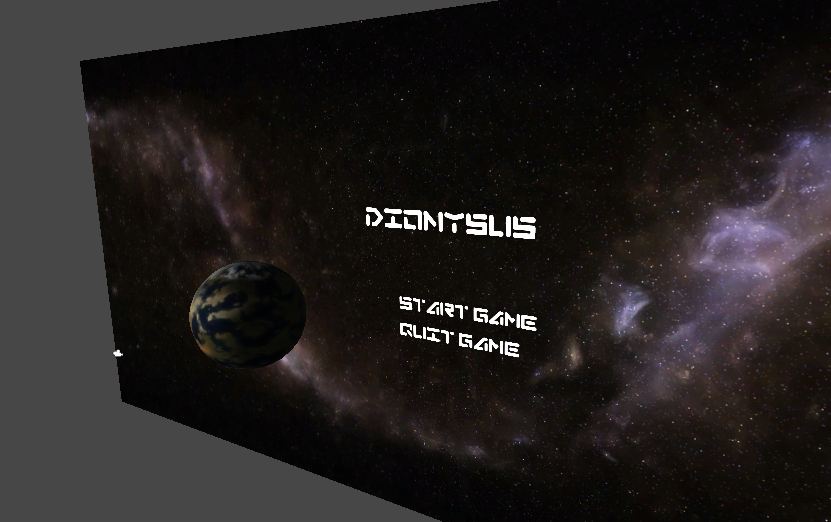
Title Screen

 
 We desided to make a title screen as all games have one so use uead the textures that JJ had made at the start of the porject and also uead the font that we where using for the game in the development stage.
 
 
Above is a close up of the planet the JJ made the texture in Photoshop we did not what to use the Hi defanition texture as we where conserned that the game would crach.
 
 
Above is the final screen that will be in the game the plant dose spin on and 360 degree rotation.

Friday, 19 April 2013

Respawn Plant Script

#pragma strict

function OnTriggerEnter (other : Collider)
{


 renderer.enabled = false;
yield WaitForSeconds (8);
renderer.enabled = true;

}

Here is the script so that when you encounter the box collider the plant will disappear for 8 seconds and the re-appear.

Friday, 22 March 2013

Terrain Picture

 
Here are some update pictures of what the tarrain looks like so far we have added the tree and other assates to the tarrain


Here is one of the planets the toop made which has been added to the tarrain.
 
 
This is a view from under water to show that the codeing that alice did makes a mist under a serten level.


above are the two panaramic views of the canyon.
 

Here is the pod in the new tarrain

 
A.I that JJ made in the tarrain textureing needs to be finished


Above are the two pictues of the inside of the pod to also show how the textures have filped onto the wronug parts of the pod maybe me combineing the pod in maya moved the uv textures i will have to find out whats wroung.
 
Problem:
 
  • Texturing of the pod
  • Lighting of the tarrain
  • Making the mist underwater thiker.
Things to Do:

  • Changing the mirror texture
 

Monday, 18 March 2013

Solar Panel Code

function Update () {
        transform.Rotate(0,2 *Time.deltaTime);
}

This is some code that Alistair found that we could use to rotate the solar panels to make it look like they're following the sun.

Tuesday, 12 March 2013

Unity & House Pod Update ( 3D Work )

House Pod

Below is the main bace for the main charicter his or her House pob these are self contaned houses, that are complete with a Shower, Toliet, Sinks, Kitchen Dining Area, Beds, TV and lots of storage. House Pod is made to be condecned with as little space as possable to save on fual and to get as many people on the ship as possalbe. As you can see below there is an inside iamge and an outside image to show you what it will look like.

Things I Need To Do:
  • Make sure textures work in unity
  • Make sure eveything is UV map
  • Add normal maps to appropriate textures
Problems:
  • After the import into unity as you can see blow from the third image some of the textures had flipped and specular map are reflecting from the wrong angle


Unity Terrain

Below is some screen shorts of the unity terrain with textures that were made by toop, these includ normal maps to add realism and shad. I have been adding in the plant & tree modles that the other members of the group have made, I had some trouble with importing the modles and adding them to the terrain painting tool for trees and making the normal maps show in the game as well by haveing to add a material to the lighting to get it to work.

Things I Need To Do:
  • add a Nature/Soft Occlusion shader to some of the models to make shadows
  • add more texture toop will be making
Problems
  • trying to get a plant that is painted on the water i had to make an invsable terrain and paint the plants on top of it as you can see below this worked
  • importing the modles and adding them to the terrain painting tool for trees bcecause of it not having a valided mesh render: But i found out the i had to delet all the history in maya and combine it into a single mesh for this to work and add an Nature/Soft Occlusion shader to get shadows


Thursday, 7 March 2013

Terrain Update ( 3D Work )


The Terrain above was unintetionley deleted by tangay but I will show it anyway. The planet is a swaopy place so i whated to make it look like it was wet and bogey so as you can see above the Terrain is pot-holed with little puddles of methan, This gives the feel that you player will be in swaop also we need to look at textures as you can see below I have been playing around with different textures to make it feel like a different planet and changeing the colour of the water to show the methan.